FLEX · Shipped 2023

Role
Product Designer
Team
1 PM, 4 Engineers, 2 Designers
Skills
Product Design, User Research, Information Architecture
Overview
FLEX is a centralized knowledge management platform built on SharePoint, designed to consolidate a scaling IT startup's scattered organizational knowledge into a single, searchable repository serving 200+ employees across HR, IT, Marketing, and Leadership.
THE CHALLENGE
When Knowledge Lives in People's Heads, Not Systems
When I joined the project, the startup was scaling fast with headcount doubling and projects multiplying, but the knowledge infrastructure hadn't kept pace. Employees averaged 3 to 4 tools just to find basic information: email archives, personal OneDrive folders, disconnected SharePoint sites, and Teams messages. No single starting point. No consistent structure. No system.
The real cost wasn't just time but continuity. When employees left, their knowledge left with them. Project documentation vanished. New hires inherited projects with no context and no history.
One IT lead captured it: "Every time someone leaves, we lose everything they knew. We're constantly reinventing the wheel because we can't find what we already built."
Problem
No Single Source of Truth
Employee surveys revealed a pattern of fragmented, people-dependent workflows breaking under the weight of growth.
Finding a document from another department meant a multi-step ordeal: figure out who might have it, email them, wait, follow up, repeat, or give up. A marketing manager said: "I emailed 4 people before I found the right version of that case study. By the time I got it, I'd already missed the deadline."
Different teams used different systems. HR, IT, Marketing, and Finance each had their own folder structure no one else understood. Without a single repository, multiple versions of the same document circulated across email threads. One HR manager found three versions of the employee handbook in circulation, each with conflicting policies.

Knowledge Loss at Attrition
When employees transitioned off projects, files lived in personal folders and context lived in their heads. One IT lead said: "We've rebuilt the same integration three times because we couldn't find the documentation from the first two implementations."
New hires described onboarding as "figuring it out alone." No central hub. No clear path. Every new hire personally reaching out to HR for information that should have been self-service.
Stakeholder interviews across HR, IT leadership, and CXOs surfaced the same root cause with different symptoms. HR was drowning in repetitive document requests, IT was unable to enforce documentation standards, and leadership couldn't find reports without a follow-up chain. One CXO said bluntly: "I need answers in seconds, not after a follow-up chain. If I can't find it immediately, I assume it doesn't exist."
process of Bringing "flex" to life
1. Stakeholder Alignment : Defining What "System" Means
I organized alignment sessions with HR, IT leadership, and department heads. The breakthrough question: "If you could find any file in under 10 seconds, what would need to be true?"
The answers converged on three pillars: a single starting point, a consistent structure, and clear ownership on every document.
This reframing was critical. Stakeholders had framed the problem as "We need better search." But search is a symptom, not a solution. If files are scattered, inconsistently named, and stored in personal folders, even the best search engine fails.
2. The Pivot: From Tool to System
The initial instinct was to focus on search functionality such as AI-powered search and Microsoft Graph integration. I pushed back. The pivot came when I reframed the challenge: "We're not building a search tool. We're building a knowledge architecture. Search is just the interface to that architecture."
That shift from tool-first to system-first changed everything. Instead of starting with UI, we started with information architecture: taxonomy, naming conventions, folder structures, access hierarchies, and documentation templates.
The Solution
The Five Core Design Principles
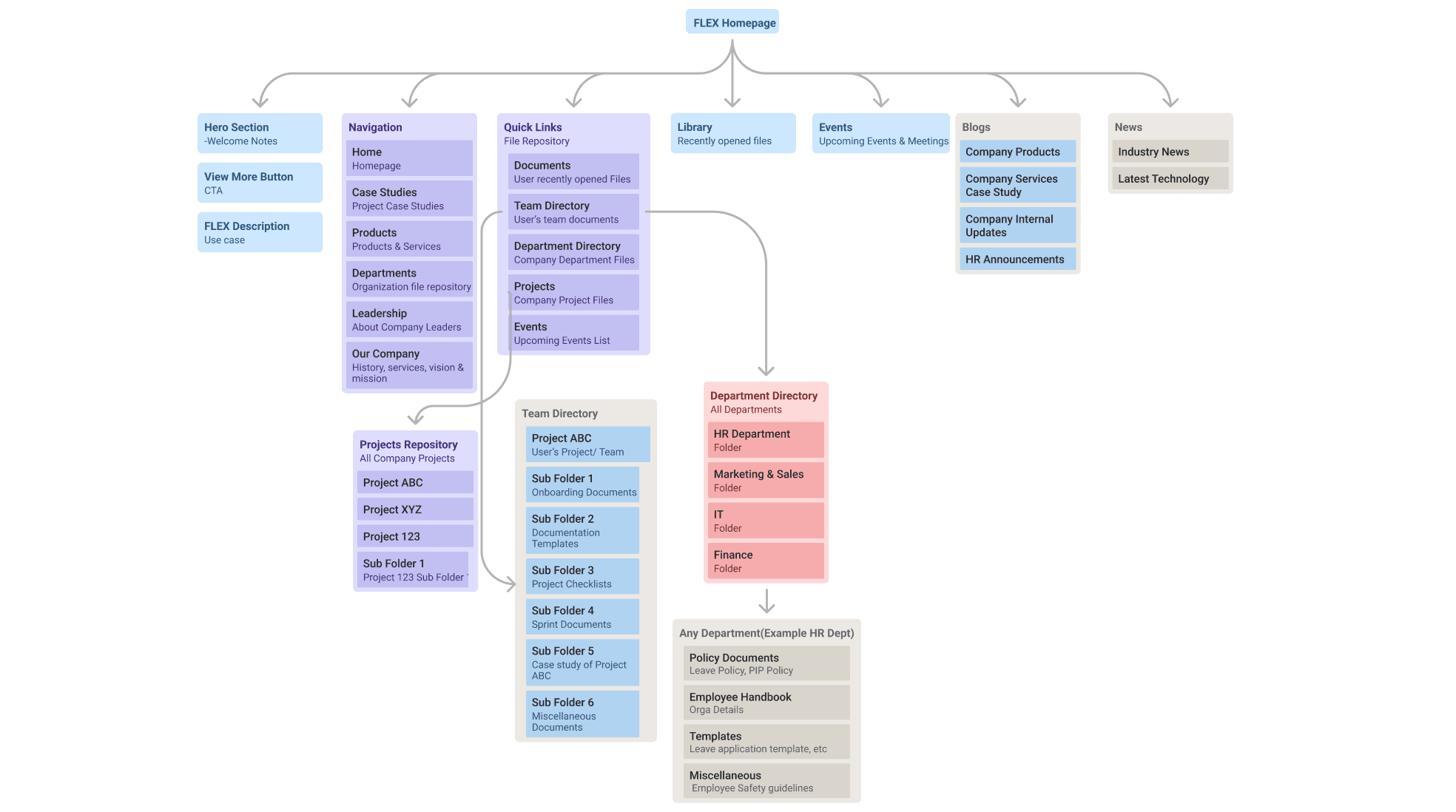
Structure for findability, not just storage. Organize by department, document type, and project rather than by person or date. Make the taxonomy predictable so users navigate by logic, not memory.
Centralize, don't fragment. One repository. One URL. No personal folders as source of truth.
Enforce documentation as process, not afterthought. Templates make it easier to document correctly than to skip it.
Design for zero human dependency. Users should never need to ask someone for a file.
The FLEX taxonomy
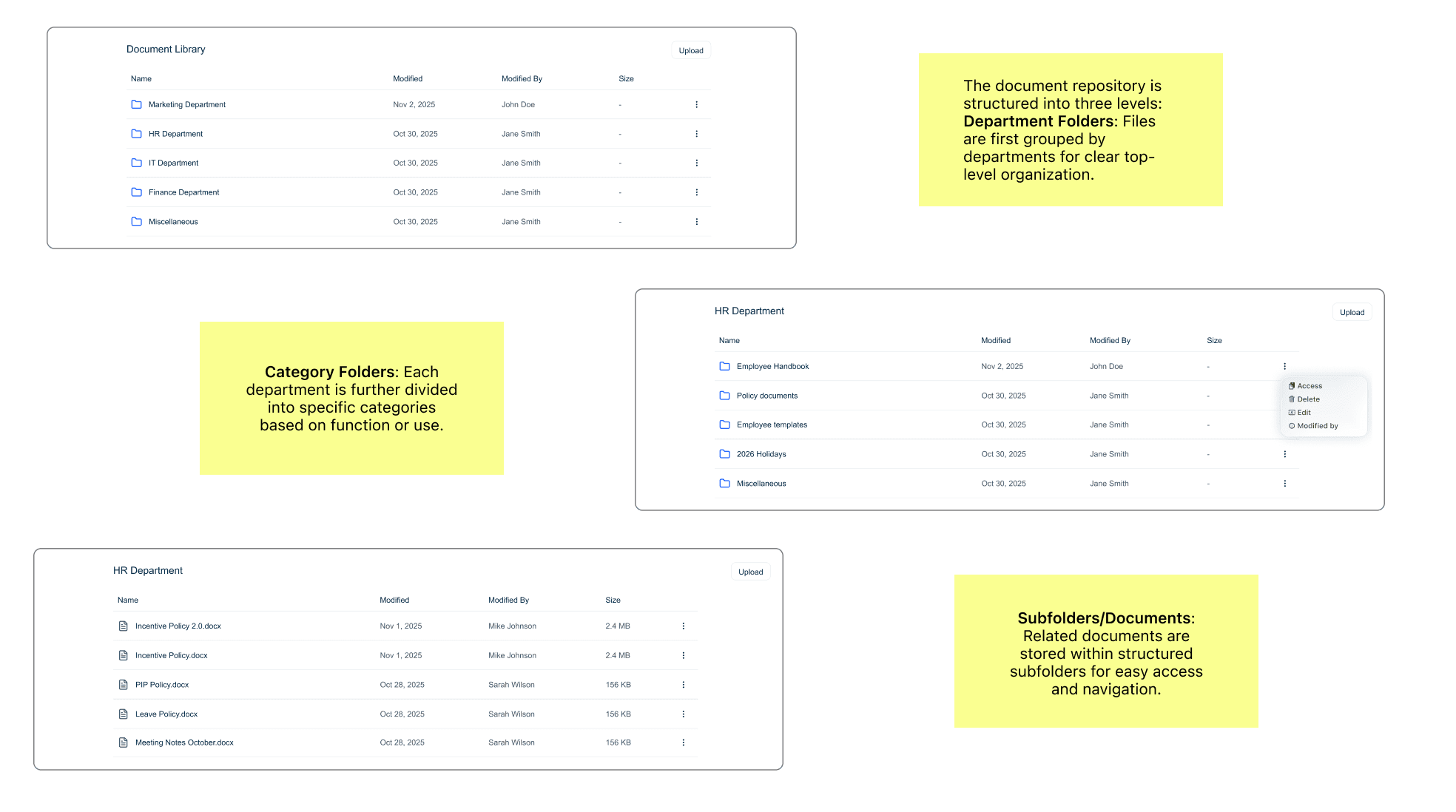
The core of FLEX wasn't the UI but the taxonomy. A three-tier folder structure:
Tier 1 covers department-level folders across HR, IT, Marketing, Finance, and Operations. Tier 2 organizes document-type subfolders including Policies, Templates, Project Documentation, Case Studies, and Reports. Tier 3 contains project or topic-specific folders within each document type.
Every file had a logical home. Every user could navigate by reasoning, not guessing.
Final Designs


Validation
Before organization-wide rollout, I tested with representatives from each user group including HR, IT, Marketing, new hires, and leadership. Tasks were realistic: find the current employee handbook, locate architecture documentation, access Q3 case studies, and complete onboarding as a new hire.
Every participant completed their task in under 30 seconds. Several completed tasks in under 10.
A marketing manager: "I found the case study in 8 seconds. It used to take 20 minutes and three emails."
A new hire on the onboarding hub: "This is what I needed on day one. Everything I was hunting for is right here."
A CXO finding a financial report in 6 seconds during a simulated meeting: "No waiting, no follow-ups, no ambiguity."
The templated documentation, which was the biggest question mark, succeeded because teams didn't have to decide what to include. An IT lead: "I've been avoiding documentation because I didn't know where to start. This template makes it obvious."
IMPACT
FLEX launched organization-wide six weeks after initial alignment. Within the first month:
65% reduction in average file search time, bringing 15 to 20 minute searches down to under 5 minutes and often under 1. 80%+ employee adoption within 6 weeks with no training campaigns required. 45% reduction in onboarding time, making new hires productive in 1 week instead of 2 to 3. Zero knowledge loss incidents post-implementation. 50%+ reduction in HR support requests for routine documents.
KEY TAKEAWAYS
Knowledge management is a system design problem, not a tool problem. Better search doesn't fix a structure problem. The underlying taxonomy, naming conventions, and folder hierarchies had to come first because tools enable systems, but systems come first.
Consistency is the price of findability. The mandatory structure created friction upfront and it was non-negotiable. Flexibility feels good in the moment; consistency pays dividends over time.
Documentation happens when it's easier than not documenting. Teams weren't avoiding documentation because they were lazy. They avoided it because they didn't know where to start. Make the right behavior the easy behavior.
Onboarding is a litmus test for any knowledge system. If a new employee can't find what they need without asking someone, the system has failed. Design for the user who knows nothing, and everyone else benefits.